Press Home.
Start watching.
A TV is for watching. Flix Launcher turns your Android TV home screen into a place to do just that: the episode you're halfway through, films worth starting and your streaming apps, with no ads and nothing on sale. Free, open source, about 700 KB.
Android TV 9 or later · MIT licence · Updates itself
Recorded on a Sony BRAVIA with 2 GB of memory
Same TV.
Different evening.
Drag across. On the left, the stock Google TV home screen. On the right, Flix on the same TV.

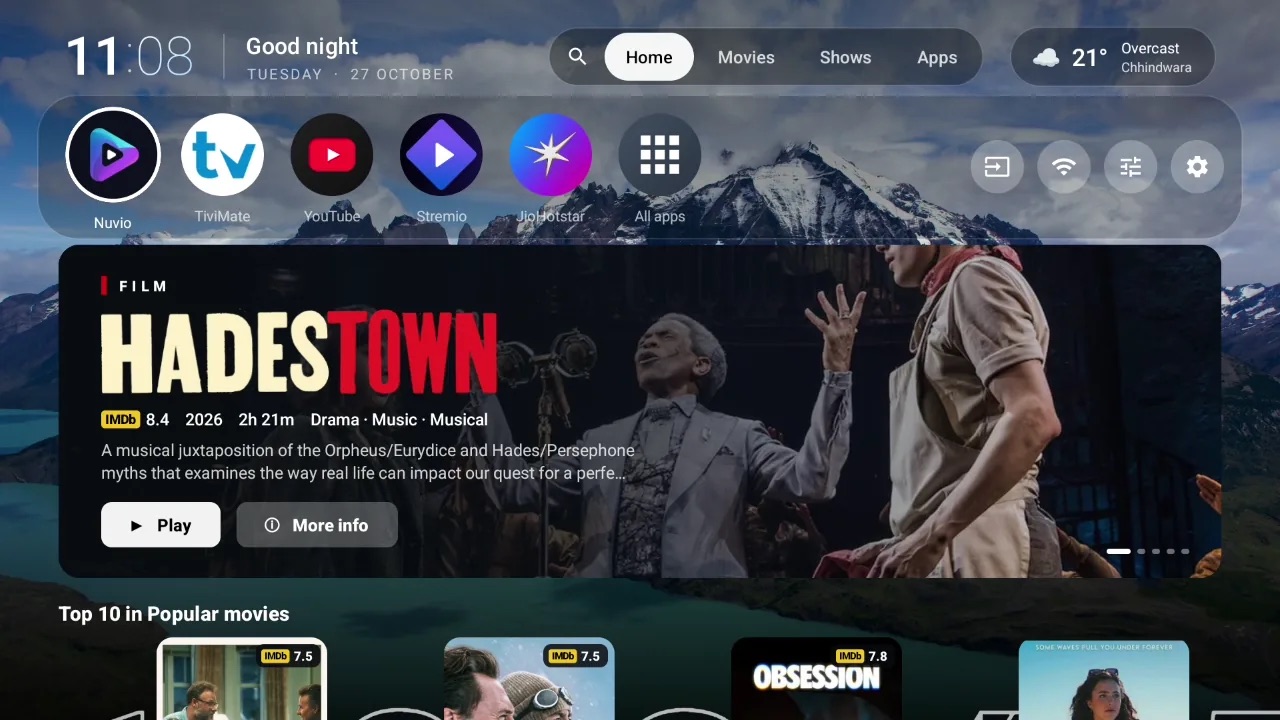 Google TVFlix
From the sofa
to the film.
The home screen shows what you're watching, not what someone wants to sell you. Choose a part of it to see what it does.
Nothing between
you and the show.
Nothing to skip
No sponsored rows, no promoted apps and no analytics. Flix only talks to what it shows you: your addons, Nuvio if you sign in, the weather and the backgrounds.
Home always means home
Google TV keeps the Home button for itself. Flix takes it back with a tiny accessibility service that only listens for that key, and can switch it back on by itself after updates.
Quick on any TV
About 54 MB of memory on a 2 GB TV, so the memory goes to your streaming app, not the menu. Artwork loads only for the card you're on.
Set up for your sofa
Pick the rows you care about and their order, poster size, theme and background. Every setting is searchable, and the remote is all you need.
Never interrupts the film
Updates download in the background and install while the TV is idle. If you'd rather choose, press OK on the "Update ready" pill.
The credits
- Download size
- About 700 KB
- Memory
- About 54 MB on 2 GB
- Runs on
- Android TV 9 or later
- Works with
- Nuvio & Stremio addons
- Advertising
- None
- Licence
- MIT, open source
- Price
- Free
Tested on Sony BRAVIA, and built for any Android TV device: TCL, Hisense, Philips, Xiaomi Mi Box, Chromecast with Google TV, NVIDIA Shield, Onn.
Set up before
the popcorn's done.
Flix isn't on the Play Store, so you install it once by hand. It keeps itself up to date after that.
Get the APK
Download flix-launcher.apk (about 700 KB), or pick a version from the releases.
Install it on the TV
Use a sideloading app like Downloader or Send Files to TV, or from a computer: adb install flix-launcher.apk
Make it home
Open Flix and follow the setup: connect Nuvio, pick your rows, then switch on Flix Launcher in Settings → Accessibility. Now Home opens Flix.
Questions
How do I remove ads from the Google TV home screen?
Install Flix Launcher and switch it on in Settings → Accessibility. The Home button then opens Flix, which has no ads or sponsored rows. The stock launcher stays installed, unused.
Which TVs does it run on?
Any Android TV device on Android 9 or later, including Sony BRAVIA, TCL, Hisense, Philips, Xiaomi Mi Box, Chromecast with Google TV and NVIDIA Shield.
Does it work with Nuvio and Stremio addons?
Yes. Sign in with Nuvio for Continue watching and your addons' rows. Titles open in Nuvio, including the Play Store version and the NuvioPlusIPTV fork.
Is it free?
Yes, free and open source under the MIT licence, with no ads and no analytics.
How does it update?
New versions download in the background from GitHub. An "Update ready" pill appears on the home screen; it installs when the TV is idle or when you press OK.
How do I go back to the stock launcher?
Switch off Flix Launcher in Settings → Accessibility, or uninstall it.